Showing posts with label hard. Show all posts

Saturday, February 1, 2014

How to Hard Reset Samsung Infuse 4G

Solution 2
1. Turn off the device. If it is stuck then try to pull out the battery for a minute and then put it back in.
2. Press down the Volume key and the Power button.
3. Then release the Power button.
4. Now a menu appear give you the options to Fastbook, Recovery, Clear Storage, and Simlock. Select Clear Storage. Use the Volume Down button to navigate the menu.
5. Then press and release the Power button.
6. Finally wait for your device to reboot.
Once the Samsung Galaxy Gio restarted it should now go back to the default factory setting.

Solution 3 - Reset through software menu

1. First go back to the Home screen.
2. Then press on the  Menu key.
3. Next pick Settings.
4. Now choose Privacy.
5. Next choose Factory Data Reset.
6. Then Select Reset Phone. If you want to erase the SD card too then ensure the checkbox Erase SD card is ticked.
android-reset-phone
 7. Put in the password when prompt.
8. Now tap on Erase everything.
android-reset-phone-3
Your phone should start to reboot short and bring itself back to factory setting.

Motorola XT390 hard reset Andorid

Motorola XT390 hard reset Andorid

XT390 Factory Reset - Recovery menu

1. Turn off your Motorola XT390 phone.
2. Press Volume up + Volume down + Power for 2-3 seconds.
3. From the Boot options screen, use the Volume down key to navigate to the next option, then select the Recovery by using the Volume up key.
4. When you see the Motorola logo screen, press the Volume up + Volume down key.
5. On the next screen, press the Volume down key to the Wipe data / factory reset, then use the power key to select reset.
6. Press Volume down key to select YES - delete all user data and press the power key.
7. When prompted for a reboot, press the power key.
8. Wait for the reboot.

Friday, January 31, 2014

BlackBerry 9630 Bold hard reset


 Reset the device

A full reset is sometimes referred to as a hard reset. Perform a full reset when you want to clear all settings, programs and data from RAM.

Caution if you perform a full reset, your BlackBerry Bold 9700 Bold2 or 9780 returns to its default settings and looses all information that is not recorded in ROM.

Before you delete your BlackBerry® device data or media card files, consider backing up these items so that you have a copy on your computer. CAUTION: If you have turned on encryption, the process for deleting all device data can take up to an hour to complete. You cannot stop the process after you start it. If you reset your device, the process restarts after the device restarts.

To perform a hard reset:

On the Home screen or in a folder, click the Options icon.
Click Security *gt; Security Wipe.
To delete data from the messages application, contacts application, and other applications, select the Emails, Contacts, Etc check box.
To delete all third-party applications that you have added, select the User Installed Applications check box.
To delete all files from your media card, select the Media Card check box.
Type blackberry.
Click Wipe.

Thursday, January 30, 2014

How to hard reset Samsung Galaxy Y Duos

Samsung Galaxy Y Duos Secret Codes
Galaxy Y Dual Sim Code
Here i am going to show you how to access the internal function of galaxy y or android phone for testing the various hardware parts of your phone if it is working properly or not with the help of this secret code you can test lcd, vibration, camera, sensor (accelerometer sensor, proximity sensor, magnetic sensor), touch screen, speaker, sub key, etc... if you have any hardware problem with your galaxy y duos you can identify with this code if it is working or not to do this follow the steps below.
First of all open your keypad


Then dial the secret code *#0*#. Now you get a screen with title LCD TEST and below that you have lots of option to test various hardware parts of your phone such as speaker, sensor, lcd, etc
To go back use right physical button
while testing the touch you have to touch and mark all the squares back button does not work
Other use full secret codes for android phone tested on galaxy y


  • * #1234# to check software version of phone.
  • *#12580*369# to check software and hardware information.
  • *#0228# Battery status (ADC, RSSI reading)
  • *#32489# Service mode
  • *#7780# factory data reset galaxy y
  • *2767*3855# Full factory reset (Dont dial it does not ask you to confirm unless you have problem)


These codes will work on all the models of galaxy series.


Monday, January 27, 2014

Nokia Lumia 1020 Restore Factory Hard Reset Remove Pattern Lock

Nokia Lumia 1020 Restore Factory Hard Reset Remove Pattern Lock
Before you buy a new cell phone or a new tablet, try the following procedure to repair your appliance. Charge first battery, make backups of your important data, if possible, and in most cases, remove SIM and SD card. Unable to recover data after performing a hard reset, Internet backup is always important. For all data, a backup should be performed on an external device, hard disk or system support band. With or without insurance, if your lost cell phone, damaged or stolen, at least, is a backup copy of your valuable data in a safe place.
Nokia Lumia 1020 force reboot and factory reset
Press and hold both the Volume down and the Power keys for 15 seconds. Warning! All downloaded apps, messages, all data will be deleted and restored to factory state!
Nokia Lumia 1020 hard reset
First try this to soft reset your Nokia 1020 Lumia. Turn off your Nokia 1020 Press and hold the Volume down and Power buttons until it vibrates, after that you have to release all the keys then phone will vibrate 3 times. All data will be lost!
To hard reset your Nokia Lumia 1020 using key combination – WP8 – Windows Phone 8
Recover your Windows phone 8 phone Nokia Lumia 1020 (WP 7 see below) reset forgotten password Nokia Lumia 1020 phone, unlock your Nokia Lumia 1020
1. Turn your Lumia 1020 off.
2. Press Volume DOWN and keep pressing it while you connect the charger until you see an exclamation mark!.ZTE Z431 User Guide Manual Free download now
3. Press – in this order – Volume UP – Volume DOWN – POWER – VOLUME DOWN.
4. Your phone will reset and reboot. Pls be patient during the reset process.
To hard reset your Nokia Lumia 1020 using key combination – WP7 – Windows Phone 7
Turn off your Nokia Lumia 1020. Press and hold the following buttons Camera + Volume down + Power until your phone vibrates, then release only the Power key and keep pressing the Camera + Volume down for a couple of seconds 4-5s until the phone reboots.
Nokia Lumia 1020 Restore Factory Hard Reset Remove Pattern Lock
Nokia Lumia 1020 Restore Factory Hard Reset Format Phone.So lets start the Nokia Lumia 1020 Restore Factory, Nokia Lumia 1020 Hard Reset.Turn Off the mobile phone for few mints.Nokia Lumia 1020 Remove Pattern Lock.

Thursday, January 23, 2014

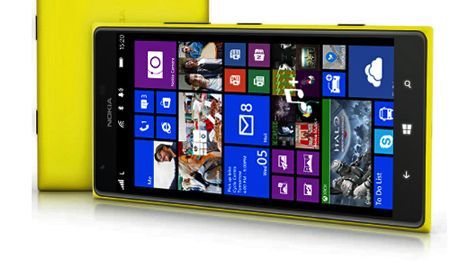
Nokia Lumia 1520 Restore Factory Hard Reset Remove Pattern Lock

Nokia Lumia 1520 Restore Factory Hard Reset Remove Pattern Lock
Before you buy a new cell phone or a new tablet, try the following procedure to repair your appliance. Charge first battery, make backups of your important data, if possible, and in most cases, remove SIM and SD card. Unable to recover data after performing a hard reset, Internet backup is always important. For all data, a backup should be performed on an external device, hard disk or system support band. With or without insurance, if your lost cell phone, damaged or stolen, at least, is a backup copy of your valuable data in a safe place.
Nokia Lumia 1520 force reboot and factory reset
Press and hold both the Volume down and the Power keys for 15 seconds. Warning! All downloaded apps, messages, all data will be deleted and restored to factory state!
Nokia Lumia 1520 hard reset
First try this to soft reset your Nokia 1520 Lumia. Turn off your Nokia 1520 Press and hold the Volume down and Power buttons until it vibrates, after that you have to release all the keys then phone will vibrate 3 times. All data will be lost!
To hard reset your Nokia Lumia 1520 using key combination – WP8 – Windows Phone 8
Recover your Windows phone 8 phone Nokia Lumia 1520 (WP 7 see below) reset forgotten password Nokia Lumia 1520 phone, unlock your Nokia Lumia 1520
1. Turn your Lumia 1520 off.
2. Press Volume DOWN and keep pressing it while you connect the charger until you see an exclamation mark!.LG Rumor Reflex S User Guide Manual Free download now
3. Press – in this order – Volume UP – Volume DOWN – POWER – VOLUME DOWN.
4. Your phone will reset and reboot. Pls be patient during the reset process.
To hard reset your Nokia Lumia 1520 using key combination – WP7 – Windows Phone 7
Turn off your Nokia Lumia 1520. Press and hold the following buttons Camera + Volume down + Power until your phone vibrates, then release only the Power key and keep pressing the Camera + Volume down for a couple of seconds 4-5s until the phone reboots.
Nokia Lumia 1520 Restore Factory Hard Reset Remove Pattern Lock
Nokia Lumia 1520 Restore Factory Hard Reset Format Phone.So lets start the Nokia Lumia 1520 Restore Factory, Nokia Lumia 1520 Hard Reset.Turn Off the mobile phone for few mints.Nokia Lumia 1520 Remove Pattern Lock.

Sunday, January 19, 2014

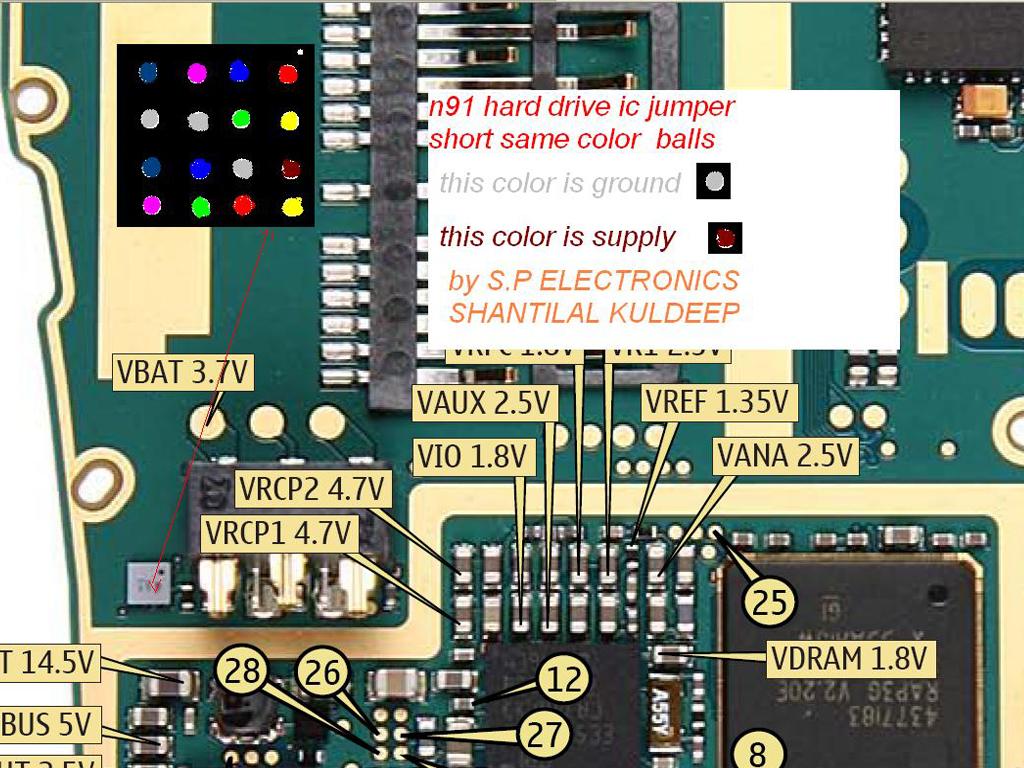
Nokia N91 hard drive ic jumper


Nokia Lumia 800 Restore Factory Hard Reset Remove Pattern Lock

Nokia Lumia 800 Restore Factory Hard Reset Remove Pattern Lock
It will remove all the data ,contacts and apps that you installed
Before you buy a new cell phone or a new tablet, try the following procedure to repair your appliance. Charge first battery, make backups of your important data, if possible, and in most cases, remove SIM and SD card. Unable to recover data after performing a hard reset, Internet backup is always important. For all data, a backup should be performed on an external device, hard disk or system support band. With or without insurance, if your lost cell phone, damaged or stolen, at least, is a backup copy of your valuable data in a safe place.
Nokia Lumia 800 hard reset
Hardreset via Keys:Samsung Galaxy Mini 2 S6500D Restore Factory Hard Reset Remove Pattern Lock
Charge your phone. Turn off your Nokia 800. Hold Volume Down + Camera + Power
Release Power, but hold Volume Down + Camera for 5 secs. Release buttons
Phone will start with factory settings without prompting
First try this to soft reset your Nokia 800 Lumia. Press and hold the Volume down and Power buttons until it vibrates, after that you have to release all the keys then phone will vibrate 3 times.
To hard reset your Nokia Lumia 800 using key combination
Turn off your Nokia Lumia 800. Press and hold the following buttons Camera + Volume down + Power until your phone vibrates, then release only the Power key and keep pressing the Camera + Volume down for a couple of seconds 4-5s.
Nokia Lumia 800 Restore Factory Hard Reset Remove Pattern Lock
Nokia Lumia 800 Restore Factory Hard Reset Format Phone.So lets start the Nokia Lumia 800 Restore Factory, Nokia Lumia 800 Hard Reset.Turn Off the mobile phone for few mints.Nokia Lumia 800 Remove Pattern Lock.