if you have insert sim problem in Nokia 5800 then it can be solve with a few steps that are written in this post.look at the diagram bellow and follow few steps that are givenin it.in case of insert sim problem, no sim, invalid sim.
Nokia 5230 mic not working problem solution jumper ways

in first step check sim pints in mobile may be they are damage or corbon on it.then rub it and check.if problem can not be solved then after dis assambly of Nokia 5800 check all parts that are shown in above diagram and also check all tracks.
all path are defined with different colors so that you can easily find out them.and replace them or apply jumpers to solve Nokia 5800 insert sim problem solution.
for more detail and new tips and tricks about cellphone service problem keep visiting this page we will update cellphone service diagrams timely with new cellphone diagrams.some related post are also given bellow you can read them also for more information about cellphone.
Nokia 5230 mic not working problem solution jumper ways
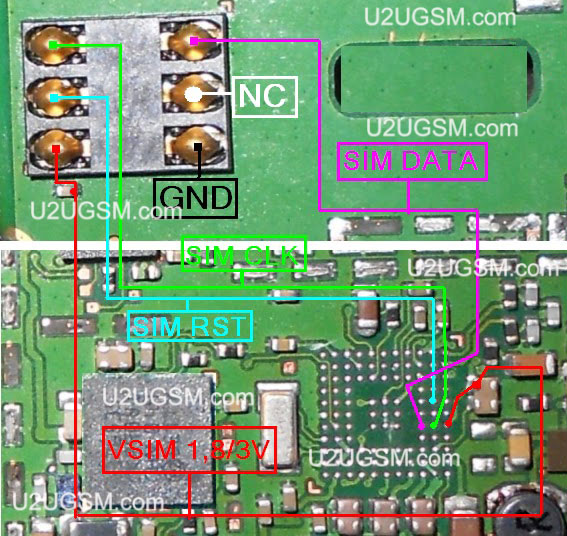
in first step check sim pints in mobile may be they are damage or corbon on it.then rub it and check.if problem can not be solved then after dis assambly of Nokia 5800 check all parts that are shown in above diagram and also check all tracks.
all path are defined with different colors so that you can easily find out them.and replace them or apply jumpers to solve Nokia 5800 insert sim problem solution.
for more detail and new tips and tricks about cellphone service problem keep visiting this page we will update cellphone service diagrams timely with new cellphone diagrams.some related post are also given bellow you can read them also for more information about cellphone.


