305 Create Ionic Sales Book Master Detail Records

.
305 Create Ionic Sales Book Master-Detail Records
Building On Codepen Platform
Continue from the previous tutorial, http://basic-steps.blogspot.my/2017/01/304-create-ionic-sales-book-master.html
Continue from the previous tutorial, http://basic-steps.blogspot.my/2017/01/304-create-ionic-sales-book-master.html
CodePen:http://codepen.io/notarazi/pen/oBWXOv
1) Prepare Insert Record Modal.
HTML (add codes to the HTML)
<script id="insertRecord.html" type="text/ng-template"> <div class="modal"> <!-- Modal header bar --> <ion-header-bar class="bar-secondary"> <h1 class="title">Insert Record</h1> <button class="button button-clear button-positive" ng-click="closeInsertRecord()">Cancel</button> </ion-header-bar> <!-- Modal content area --> <ion-content> <form ng-submit="submitInsertRecord(record)"> <div class="list"> <label class="item item-input"> <input type="date" placeholder="Transaction Date" ng-model="record.date"> </label> <label class="item item-input"> <input type="text" placeholder="Transaction Value" ng-model="record.value"> </label> </div> <div class="padding"> <button type="submit" class="button button-block button-positive">Insert Record</button> </div> </form> </ion-content> </div> </script> |
JS (add codes to the detailsCtrl Controller. This requires $ionicModal and DataTree injection.)
$scope.details = DataTree.all("salesRecordBookDetails"); //console.log($scope.details); //convert string data into date object $scope.details.forEach(function(d){ d.date = new Date(d.date); }); // Create and load the Modal $ionicModal.fromTemplateUrl(insertRecord.html, function(modal) { $scope.insertRecordModal = modal; }, { scope: $scope, animation: slide-in-up }); // Called when the form is submitted $scope.submitInsertRecord = function(record) { var d = new Date(record.date); var utcDate = new Date(Date.UTC( d.getFullYear(), d.getMonth(), d.getDate(), 0, 0, 0)); $scope.details.push({ date: utcDate, value: record.value }); $scope.details.sort(function(a,b) { return new Date(a.date).getTime() - new Date(b.date).getTime() }); DataTree.save("salesRecordBookDetails", $scope.details); record.date = ""; record.value = ""; $scope.insertRecordModal.hide(); }; // Open our new task modal $scope.insertRecord = function() { $scope.insertRecordModal.show(); }; // Close the new task modal $scope.closeInsertRecord = function() { $scope.insertRecordModal.hide(); }; |
http://codepen.io/notarazi/pen/YNVWor
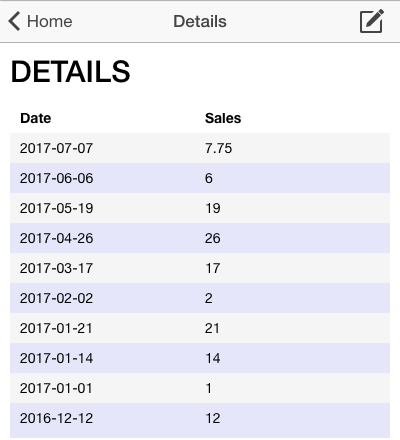
2) Add Date Search Input .
HTML
<html> <head> <meta charset="utf-8"> <title>Diary</title> <meta name="viewport" content="initial-scale=1, maximum-scale=1, user-scalable=no, width=device-width"> <!-- Internal Library <link href="lib/ionic/css/ionic.css" rel="stylesheet"> <script src="lib/ionic/js/ionic.bundle.js"></script> --> <!-- Cloud Library --> <link href="//code.ionicframework.com/nightly/css/ionic.css" rel="stylesheet"> <script src="//code.ionicframework.com/nightly/js/ionic.bundle.js"></script> <!-- Needed for Cordova/PhoneGap (will be a 404 during development) --> <script src="cordova.js"></script> <script src="https://cdnjs.cloudflare.com/ajax/libs/datejs/1.0/date.min.js"></script> </head> <body ng-app="app"> link download

Subscribe to:
Post Comments (Atom)
|
No comments:
Post a Comment
Note: Only a member of this blog may post a comment.